Quickstart
Start the server, write two rows, query and search them with curl and from your language, and look at them in the studio. About five minutes. For a database in a web page with no server, see Quickstart: in the browser.
-
Install
fenec-serverand start it on a file. It runs in the foreground, so the next steps go in another terminal.curl -fsSL https://fenecdb.com/install.sh | shThe script puts
fenec-serverand the shell in~/.fenecdb/binand edits no shell file: it prints theexportline that puts that directory on yourPATH, and the next block runs it. Add the line to~/.zshrcor~/.bashrcto keep it.What the install script prints
its last lines, on an Apple silicon MacInstalled fenecdb 0.1.12 (aarch64-apple-darwin) in /Users/you/.fenecdb/bin: fenec the shell: fenec scratch.fenec fenec-server the server: fenec-server --file notes.fenec (fenec-server 0.1.12) /Users/you/.fenecdb/bin is not on your PATH. Add it for this shell: export PATH="$HOME/.fenecdb/bin:$PATH" and put the same line in your shell's startup file (~/.zshrc, ~/.bashrc or ~/.profile) to keep it. For fish: fish_add_path "$HOME/.fenecdb/bin". A first query: https://fenecdb.com/docs/quickstartexport PATH="$HOME/.fenecdb/bin:$PATH" fenec-server --file notes.fenec --studioprintsopened: notes.fenec fenec-server 0.1.12: notes.fenec [sync=250 ms] fenec-http 0.1.12 listening on: http://127.0.0.1:8080 [no auth]docker run --rm --name quickstart -v quickstart:/data -p 127.0.0.1:8080:8080 \ ghcr.io/fenecdb/fenec-server:0.1.12 \ --http 0.0.0.0:8080 --file /data/notes.fenec --studio --insecureprintsopened: /data/notes.fenec fenec-server 0.1.12: /data/notes.fenec [sync=250 ms] fenec-http 0.1.12 listening on: http://0.0.0.0:8080 [no auth]A container listens beyond localhost, which the server allows only with a token or
--insecure. Here the port is published to this machine alone (127.0.0.1:8080), so the flag opens nothing wider; put a token on the server before it is published any further (Security). The file is in thequickstartvolume.The server listens on
127.0.0.1:8080, which only this machine reaches, and asks for no token ([no auth]).--studioserves the admin page you will open in step 5. If port 8080 is taken, start it with--http 127.0.0.1:8081(Docker:-p 127.0.0.1:8081:8080) and use that port below. On Windows, use Docker, or WSL with the macOS and Linux steps. Other ways to install: Homebrew, a.debor.rpm, a tarball, from source, in Install. -
Make a collection and write two rows. The language is FenecQL: a collection has typed fields, an index on each one you filter, order or search by (
@textfor words,@sortedfor ranges and order,@hashfor equality), and the values go as$1,$2parameters, never into the text.curl -s http://127.0.0.1:8080/query \ -d '{"query": "create collection notes (title text @text, year int @sorted, kind text @hash)"}' curl -s http://127.0.0.1:8080/query \ -d '{"query": "put notes {title: $1, year: $2, kind: $3}", "params": ["Dunes", 2021, "book"]}' curl -s http://127.0.0.1:8080/query \ -d '{"query": "put notes {title: $1, year: $2, kind: $3}", "params": ["Night at the oasis", 2024, "film"]}'answers{"message":"collection `notes` created"} {"affected":1} {"affected":1}curl prints each answer with no line break after it, so in a terminal they run together; they are shown one to a line here.
-
Read the rows back by a filter and an order, by a kind, then search their words, with a typo in the search.
curl -s http://127.0.0.1:8080/query \ -d '{"query": "get notes where year >= $1 order year desc", "params": [2020]}' curl -s http://127.0.0.1:8080/query \ -d '{"query": "get notes where kind = $1", "params": ["book"]}' curl -s http://127.0.0.1:8080/query \ -d '{"query": "get notes select title match title $1 fuzzy", "params": ["oasys"]}'answers[{"id":2,"title":"Night at the oasis","year":2024,"kind":"film"},{"id":1,"title":"Dunes","year":2021,"kind":"book"}] [{"id":1,"title":"Dunes","year":2021,"kind":"book"}] [{"title":"Night at the oasis","_score":0.62239116}]kindis a@hashindex, which answers equality and gives the studio something to count by.matchsearches the words of a@textfield,fuzzyforgives a misspelling, and_scoresays how well the row matched. -
Do the same from your language, with its client or the HTTP client it already has. Each program writes a third row, reads the rows from 2020 on, searches a word spelled wrong and ends on a refused read, with its status and the server's message. Run it once: it writes the row every time.
installpip install fenecdb # the standard library alonenotes.pyfrom fenecdb import Client, FenecError db = Client("http://127.0.0.1:8080") db.query("put notes {title: $1, year: $2, kind: $3}", ["Sand and stars", 2023, "book"]) rows = db.query("get notes where year >= $1 order year desc", [2020]) print("from 2020:", ", ".join(r["title"] for r in rows)) hits = db.query("get notes select title match title $1 fuzzy", ["oasys"]) print("search:", ", ".join(h["title"] for h in hits)) try: db.query("get nowhere") except FenecError as e: print("refused:", e.status, e)runpython3 notes.pynotes.mjsasync function query(q, params = []) { const res = await fetch('http://127.0.0.1:8080/query', { method: 'POST', headers: { 'content-type': 'application/json' }, body: JSON.stringify({ query: q, params }), }); const body = await res.json(); if (!res.ok) throw Object.assign(new Error(body.error), { status: res.status }); return body; } await query('put notes {title: $1, year: $2, kind: $3}', ['Sand and stars', 2023, 'book']); const rows = await query('get notes where year >= $1 order year desc', [2020]); console.log('from 2020:', rows.map((r) => r.title).join(', ')); const hits = await query('get notes select title match title $1 fuzzy', ['oasys']); console.log('search:', hits.map((h) => h.title).join(', ')); try { await query('get nowhere'); } catch (e) { console.log(`refused: ${e.status} ${e.message}`); }runnode notes.mjs # Node 18 or newer: fetch is built ininstallgo mod init notes go get github.com/fenecdb/fenecdb/integrations/go # the standard library alonemain.gopackage main import ( "context" "errors" "fmt" "log" "strings" fenecdb "github.com/fenecdb/fenecdb/integrations/go" ) type Note struct { Title string `json:"title"` Year int `json:"year"` } func titles(notes []Note) string { var out []string for _, n := range notes { out = append(out, n.Title) } return strings.Join(out, ", ") } func main() { ctx := context.Background() db := fenecdb.New("http://127.0.0.1:8080") if _, err := db.Exec(ctx, "put notes {title: $1, year: $2, kind: $3}", "Sand and stars", 2023, "book"); err != nil { log.Fatal(err) } rows, err := fenecdb.QueryAs[Note](ctx, db, "get notes where year >= $1 order year desc", 2020) if err != nil { log.Fatal(err) } fmt.Println("from 2020:", titles(rows)) hits, err := fenecdb.QueryAs[Note](ctx, db, "get notes select title match title $1 fuzzy", "oasys") if err != nil { log.Fatal(err) } fmt.Println("search:", titles(hits)) var refused *fenecdb.Error if _, err := db.Query(ctx, "get nowhere"); errors.As(err, &refused) { fmt.Println("refused:", refused.Status, refused.Message) } }rungo run .installcargo new notes && cd notes cargo add ureq@2 --features json cargo add serde_jsonsrc/main.rsuse serde_json::{json, Value}; fn query(q: &str, params: Value) -> Result<Value, ureq::Error> { Ok(ureq::post("http://127.0.0.1:8080/query") .send_json(json!({"query": q, "params": params}))? .into_json()?) } fn titles(rows: &Value) -> String { let titles: Vec<&str> = rows.as_array().unwrap().iter().filter_map(|r| r["title"].as_str()).collect(); titles.join(", ") } fn main() -> Result<(), ureq::Error> { query("put notes {title: $1, year: $2, kind: $3}", json!(["Sand and stars", 2023, "book"]))?; let rows = query("get notes where year >= $1 order year desc", json!([2020]))?; println!("from 2020: {}", titles(&rows)); let hits = query("get notes select title match title $1 fuzzy", json!(["oasys"]))?; println!("search: {}", titles(&hits)); // A refusal is `Error::Status` with the server's status, its body {"error": ...}. match query("get nowhere", json!([])) { Err(ureq::Error::Status(status, res)) => { let body: Value = res.into_json()?; println!("refused: {status} {}", body["error"].as_str().unwrap_or_default()); } other => { other?; } } Ok(()) }runcargo runinstalldotnet new console -o notes && cd notes dotnet add package FenecDb # HttpClient and System.Text.Json aloneProgram.csusing FenecDb; using var db = new FenecClient("http://127.0.0.1:8080"); await db.ExecAsync("put notes {title: $1, year: $2, kind: $3}", ["Sand and stars", 2023, "book"]); var rows = await db.QueryAsync<Note>("get notes where year >= $1 order year desc", [2020]); Console.WriteLine("from 2020: " + string.Join(", ", rows.Select(r => r.Title))); var hits = await db.QueryAsync<Note>("get notes select title match title $1 fuzzy", ["oasys"]); Console.WriteLine("search: " + string.Join(", ", hits.Select(h => h.Title))); try { await db.QueryAsync("get nowhere"); } catch (FenecException e) { Console.WriteLine($"refused: {e.Status} {e.Message}"); } record Note(string Title, int Year);rundotnet runNotes.javaimport java.net.URI; import java.net.http.HttpClient; import java.net.http.HttpRequest; import java.net.http.HttpResponse; import java.util.ArrayList; import java.util.regex.Pattern; public class Notes { static final HttpClient HTTP = HttpClient.newHttpClient(); // One FenecQL statement, as the JSON {"query": ..., "params": [...]}. static HttpResponse<String> query(String json) throws Exception { var req = HttpRequest.newBuilder(URI.create("http://127.0.0.1:8080/query")) .header("Content-Type", "application/json") .POST(HttpRequest.BodyPublishers.ofString(json)) .build(); return HTTP.send(req, HttpResponse.BodyHandlers.ofString()); } // The standard library has no JSON: every "title" of an answer, or its "error". static String find(String key, String body) { var found = new ArrayList<String>(); var m = Pattern.compile("\"" + key + "\":\"([^\"]*)\"").matcher(body); while (m.find()) found.add(m.group(1)); return String.join(", ", found); } public static void main(String[] args) throws Exception { query(""" {"query": "put notes {title: $1, year: $2, kind: $3}", "params": ["Sand and stars", 2023, "book"]}"""); var rows = query(""" {"query": "get notes where year >= $1 order year desc", "params": [2020]}"""); System.out.println("from 2020: " + find("title", rows.body())); var hits = query(""" {"query": "get notes select title match title $1 fuzzy", "params": ["oasys"]}"""); System.out.println("search: " + find("title", hits.body())); var refused = query(""" {"query": "get nowhere"}"""); System.out.println("refused: " + refused.statusCode() + " " + find("error", refused.body())); } }runjava Notes.java # Java 15 or newer, for the text blocksnotes.php<?php // One FenecQL statement; the answer is its status and the decoded JSON body. function query(string $q, array $params = []): array { $ch = curl_init('http://127.0.0.1:8080/query'); curl_setopt_array($ch, [ CURLOPT_POST => true, CURLOPT_RETURNTRANSFER => true, CURLOPT_HTTPHEADER => ['Content-Type: application/json'], CURLOPT_POSTFIELDS => json_encode(['query' => $q, 'params' => $params]), ]); $body = json_decode(curl_exec($ch), true); return [curl_getinfo($ch, CURLINFO_RESPONSE_CODE), $body]; } query('put notes {title: $1, year: $2, kind: $3}', ['Sand and stars', 2023, 'book']); [, $rows] = query('get notes where year >= $1 order year desc', [2020]); echo 'from 2020: ', implode(', ', array_column($rows, 'title')), "\n"; [, $hits] = query('get notes select title match title $1 fuzzy', ['oasys']); echo 'search: ', implode(', ', array_column($hits, 'title')), "\n"; [$status, $error] = query('get nowhere'); echo 'refused: ', $status, ' ', $error['error'], "\n";runphp notes.php # with the curl extensionnotes.rbrequire "json" require "net/http" # One FenecQL statement; the answer is its status and the decoded JSON body. def query(q, params = []) res = Net::HTTP.post(URI("http://127.0.0.1:8080/query"), JSON.generate(query: q, params: params), "Content-Type" => "application/json") [res.code.to_i, JSON.parse(res.body)] end query("put notes {title: $1, year: $2, kind: $3}", ["Sand and stars", 2023, "book"]) _, rows = query("get notes where year >= $1 order year desc", [2020]) puts "from 2020: #{rows.map { |r| r["title"] }.join(", ")}" _, hits = query("get notes select title match title $1 fuzzy", ["oasys"]) puts "search: #{hits.map { |h| h["title"] }.join(", ")}" status, error = query("get nowhere") puts "refused: #{status} #{error["error"]}"runruby notes.rbEvery program prints the same three lines.
printsfrom 2020: Night at the oasis, Sand and stars, Dunes search: Night at the oasis refused: 404 collection `nowhere`Java, PHP and Ruby need no package, and Swift, Kotlin and Dart keep the database in the app instead: Your language has each one in full, with its query builder, batches and errors.
-
Open
http://127.0.0.1:8080/_studio/in a browser, leave the token empty and press Connect, and picknotesin the sidebar. Your rows are in the grid, with the counts bykindabove them. Enter writes a cell and New row adds one.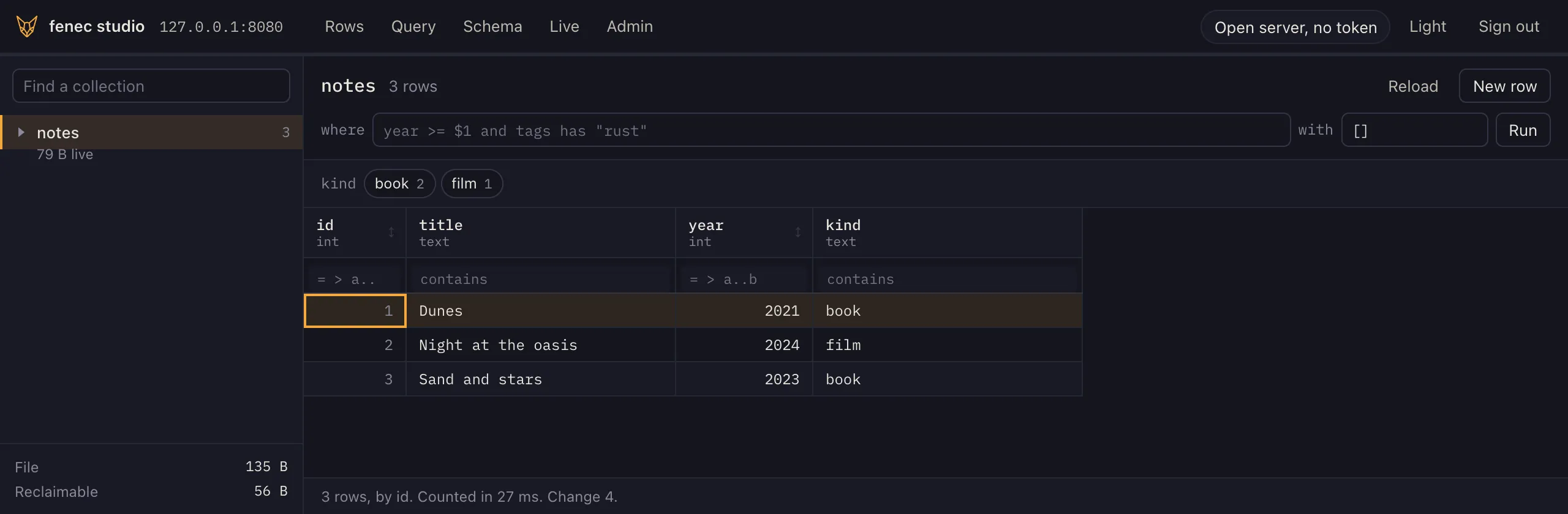
The notes after step 4, in fenec studio.
Next
- Quickstart: in the browser
The same engine in a web page, with no server: a Vite project, one package and a script.
- The shell
Run FenecQL on a file from a prompt, to learn the language or to look inside a file.
- FenecQL
The language, from a first write to a lookup and a total.
- Sync
A replica in the page or the app that reads without the network and writes on its own.
- Install
Homebrew, a package, a tarball, the image, a package for your language, or a build from source.
- Server
Tokens, durability, limits and containers, for running it for real.